back
Toronto, ON
Sales Support Central: Designing an AI-enhanced help centre to support Dell's internal sales process incidents.
TOOLS:
Figma
CLAUDE CODE
usertesting.com
META:
0 → 1
Enterprise SOFTWARE
Sales ENABLEMENT
year
2025
TEAM - SCRUM
1 Product Designer
1 Product Manager
Tech Lead + Eng Team
SCRUM Master
Content & Research Team
Confidential information and sensitive intellectual property has been omitted or obfuscated. All content reflects my own work and processes and not necessarily the views of Dell Technologies.
SUMMARY
Rebuilding the support experience for self-service:
filing a ticket is the last step, not the front door
WHAT WAS SHIPPED
A self-service support experience that gives sellers autonomy, and if it fails, we still got you
IMPACT
Outcomes measured a quarter post launch
2
self-serviced of every 6 engagements
8
249
Knowledge article views per week
7
Median time to raise a new support case
WHY WE BUILT THIS
Dell's sellers use internal tools for quoting, orders, tracking, relationship, customer success, and troubleshoot product catalogue. When one thing breaks, the deal stops. It ran on a decade of Salesforce patchwork and scored among the worst of Dell's internal tools: NPS of 5 out of 10, CSAT of 2 out of 5, CES of 7 out of 10.
Sales Support Central exists to mitigate and promptly support sales issues in one place, but the platform was not absorbing the load efficiently and sales still relied on workarounds to solve issues, and every minute a seller spends chasing a solution to an issue is a minute not selling. Change was needed.
DEFINING THE PROBLEM
Just another unreliable platform
Sellers had to deal with many pivots regarding support offering across the years: platforms, web forms, Teams channels, email chains, contacts…some updated, other decommissioned, with no direction of where to go for each issue, no tracking, and in many cases resulting in nothing, just radio silence.
Sales Support Central was initially considered as one of the many unreliable "bookmarks" without a clear direction and messaging.
Business needed load balance
Business wanted SSC to be the main sales support venue. But there was significant worry about capacity to honour SLAs due to limited and decentralized support teams, all with their own processes and SLAs.
The mission was to focus on self-service as much as possible to mitigate support cases stacking up.
The goal was to make SSC self serviceable, trustworthy, and better than workarounds.
CURRENT EXPERIENCE
We pulled data from usage, feedback, cases opened, and focus groups and surfaced many pain points.
Cognitive overload overdrive
The whole experience was confusing and presented upfront: searching, knowledge articles, raising a case, resources, everything was in the same bucket and presented as cards, with no differentiation, treatment, no clear messaging, grouping, or hierarchy.

WHO WE ARE BUILDING IT FOR
Findings came from sales representatives, and support agent journey maps, interviews with key sales reps, survey responses from 200 sales reps, and a review of a number of "support venues" looking to understand each handles when the sales issues arise, how they look for support, deflection, and post submission experience.

"The tenured sales rep"
Built a private tribal knowledge system, bookmark folders and direct contacts that worked well enough for them (and were invisible to everyone else).
Hard to migrate, the official tool has to beat a system they built themselves.

"The new hire"
No workarounds, no contacts, no shortcuts, no previous knowledge, don't know where to go outside of learned in training. They struggle a lot with support platform issues and depend on seniors to get to alternative channels, adding another layer of delay on top of it.

"The support agent"
Support teams are siloed and especialized in one category, each with their own tools and rules of engagement, with a limited headcount and focused on SLAs, when an issue is not within their realm or a solution is not viable, they close the case and move on.
DESIGN DECISIONS
Efficiency
Every screen should answer a question before offering a form.
Continuity
Nothing already said should be asked again.
Visibility
The case lifecycle should be clear and visible.
Straight
Respect time by offering shortcuts for known issues.
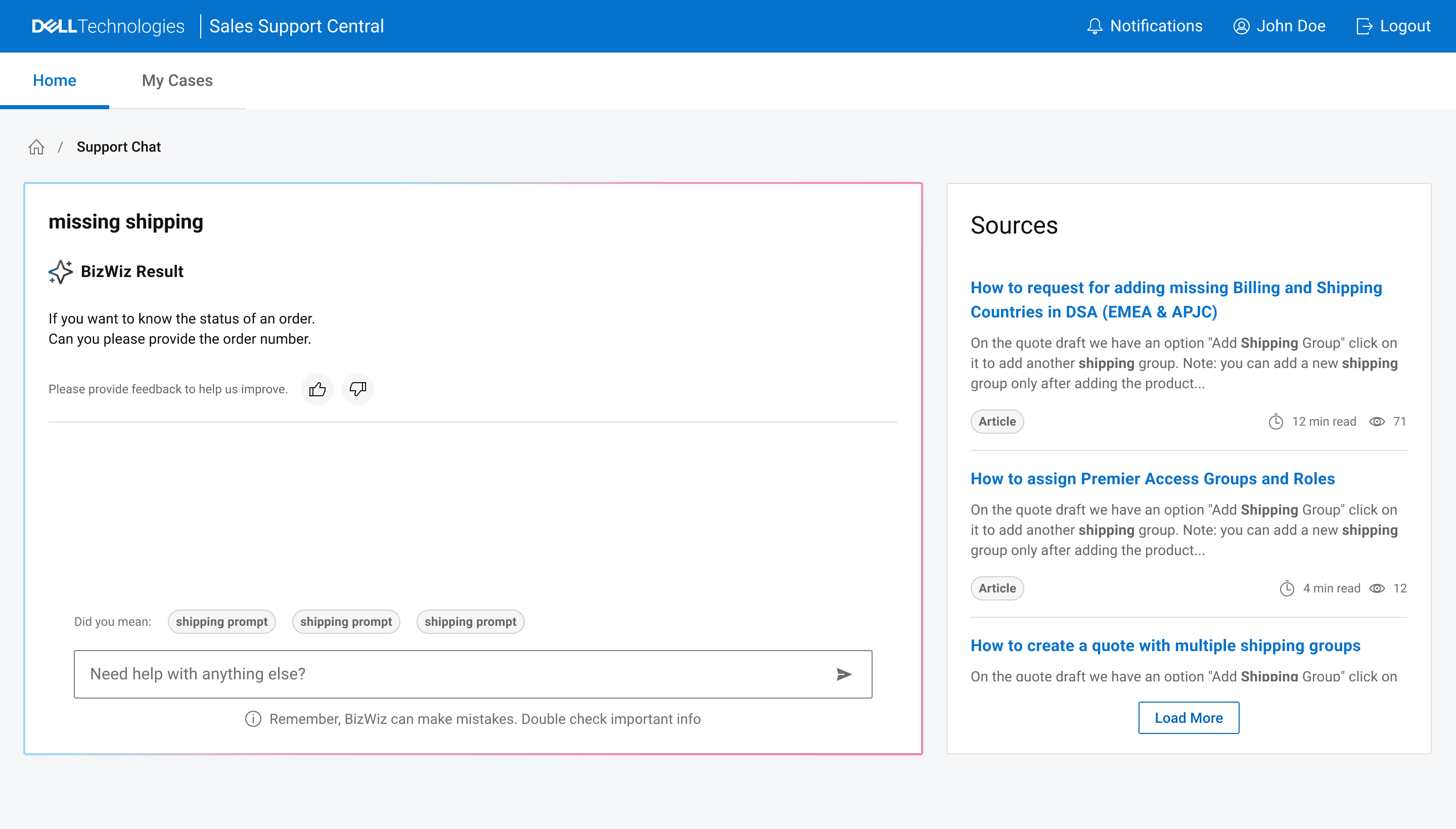
AI Support Chat drives screening for new hires and low field-knowledge users, guiding them toward fixes while filling the intake form behind the scenes. When a case does need raising, it asks almost nothing, so it feels like a fast, low-friction form.
The flow start at the home screen, you paste, describe, explain, ask about your issue, the AI Support guides the user to answers.
First iteration was a simple panel chat with little interaction, simple question > answer, straight to the point. It tested ok in quantitative scores, but qualitative it was off, people were uninpressed and didn't shown excitement.
Articles were just a wall of text, so we've redone it focusing on guidance and interactivity with SSC.
First iterations were, like the chat, more tame, stripping most of the confusing information that reads like documentation, and focused on ETA and simple guidance. Straight to the point still. Feedback sugested we need more ways to source help since, aside from tenured reps, no one had knowledge of the system.

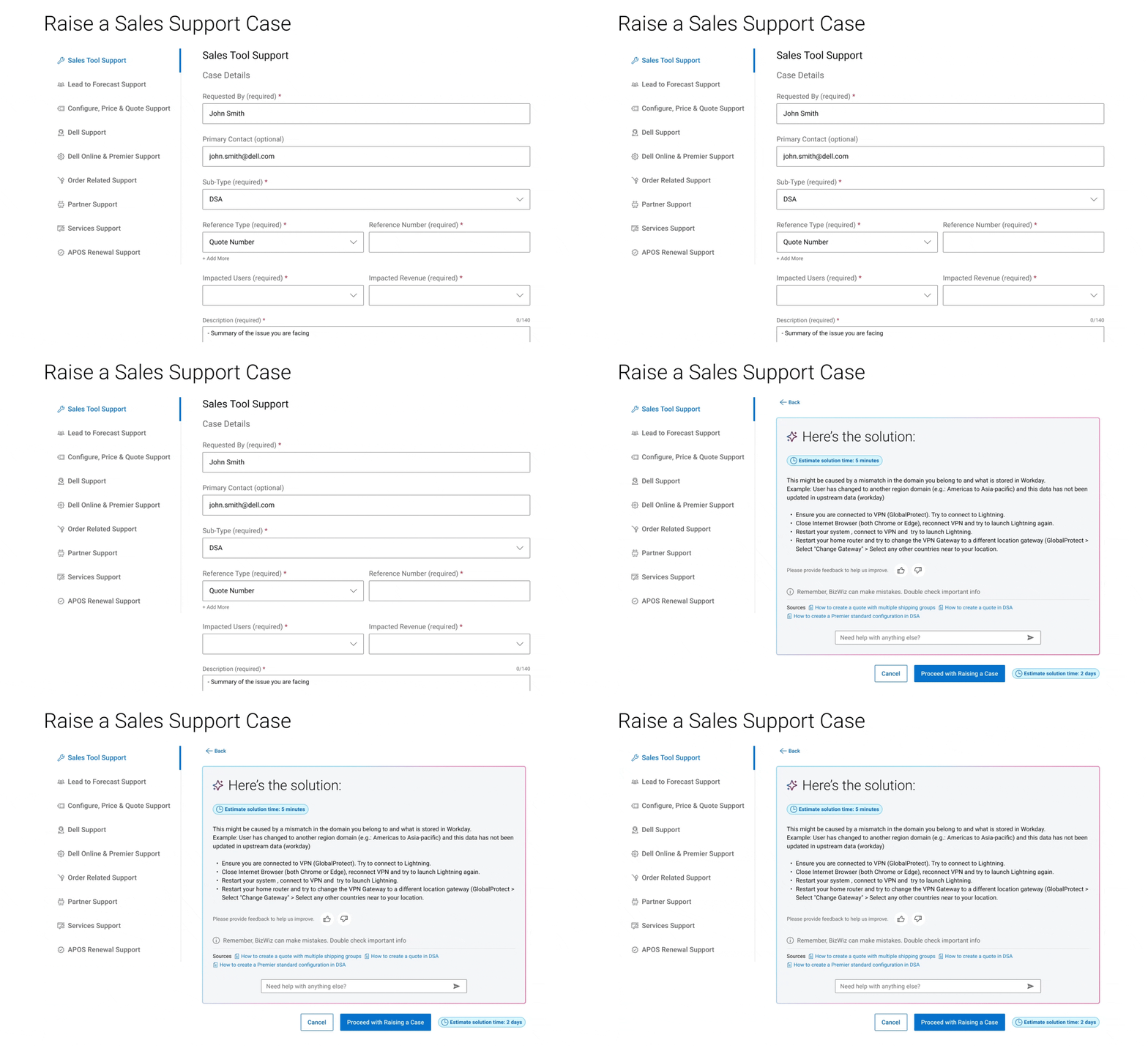
Raising a case required going through a very long, high cognitive load, and uncategorized single intake form, that lived in one link in one place. Now we've made it available from multiple places, categorized, simplified and in multiple sizes depending on the context available.
We've added entryways to Raise a Case everywhere in the portal without flagging it too much because we wanted to emphasize self-service without losing the ability to directly open a case for recurring instances that there's no way to self-service.
First go around focused on splitting the case form into help desks and categories, also having AI combing the issue to bring knowledge articles as the user filled the form before actually opening the case. Feedback sugested that it was too intrusive and they wish they could bypass AI in this place.
SSC didn't had a way to track cases aside from an ocasional noreply email, now it got one.
For tracking cases we went with a tried and proven table management format, reflecting the users work mental model.
The first few iterations we tried different ways to do case alerts based on platform feasibility, most didn't faired great in testing because of how under the radar they've looked.

Debrief
Finding your user champions.
It's difficult to get quality feedback when the product already let down the user base. What moved the needle and helped us building the product forward was grouping a set of champion users, giving genuine, engaged, no prisoners taken feedback. It wasn't easy though, Dell is very protective of their sales team time (and time is money), I spent time and a lot of back and forth with business heads to build this group but I highly recommend finding yours!
AI-coded prototypes make things 100x easier.
Building fast concept prototypes produced better quality discussions with stakeholders and engineers. It allowed me to loop back faster with key SMEs to validate proof of concept and made the whole test -> validation loop more approachable.
Deciding what idea goes is harder than having it.
A lot of ideas got thrown around as a consequence of prototyping with AI, the hard part was understanding what move the needle for the users and which of those ideas would be feasible. Even prototyping in code using the same stack as the production code, a lot of the ideas couldn't be safely implemented.
Tracking reasoning down when tools are AI-based.
It's easy to not document process when you iterate in code so fast and Figma and code iteration are drifting. What helped me keep things reversible and grounded was to be very specific about git commits, track iterations down in Figma, and keep Notion rationale notes of the builds.